Data Display on Grid Pages
This article describes how to sort, filter, and manage the layout of grid-like pages.
Overview
You control the data displayed on grid pages with the View/Filter Control Bar and with individual column control menus.
Views
The display of data on spreadsheet grid-like pages is controlled by specifications called “Views”. Views are specific to page types: project, resource, assignment, and others.
Views have names that are displayed in a view selection drop down in the upper right on pages to which they apply.
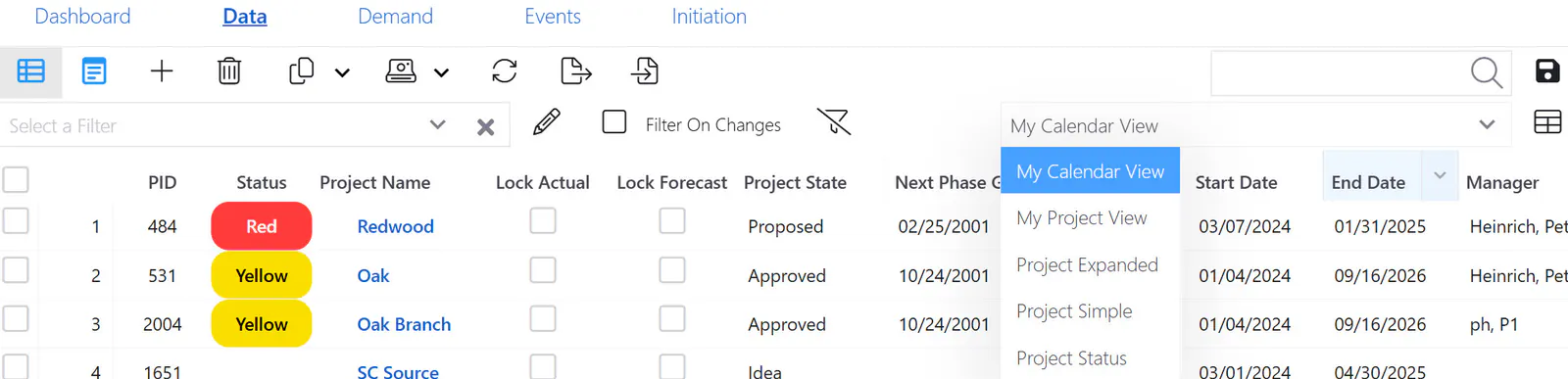
System views are created by ResourceFirst administrators; partition custom views are created by partition administrators, and personal custom views are created by individual users.
Note: When a system-wide view is active and the user modifies column properties, those column settings are saved to the user’s definition of the system-wide view. The only attribute of system-wide views that cannot be changed in this manner is which fields are available for display in the view.
This means that administrator changes to system views do NOT propagate to user modified instances of the system view.
Properties that can be changed by actions on the page are:
Column freeze state
Visibility
Left-to-right order
Column width
See the article User Defined Views for how to create and edit your own personal views.
Scrolling
Pages with spreadsheet type grids have a horizontal scroll bar at the bottom and a vertical scroll bar on the right if needed.
Filtering Views
Most grid-style pages have a set of filter controls just below the page toolbar.
The filter controls are on the left of the filter/view toolbar:

See the article Grid Page Filtering for more detail.
Column Header Features
Click in a column header cell to open the drop-down column control menu for that column.
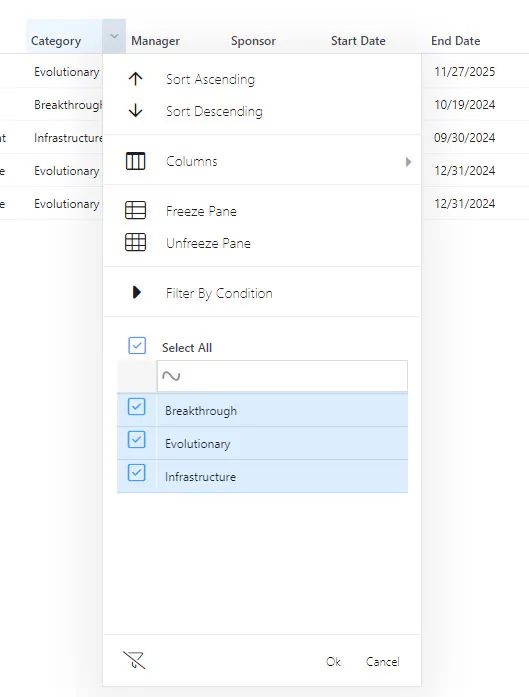
See the article Column Controls for more detail.