Viewing Assignment Value Types
This article explains how to view and enter different data types on the Labor and Financial Assignment pages.
Forecast, Baseline, Actual, and combined Actual/Forecast values can be displayed on both pages. On the Labor Assignment page, the cost of labor forecasts can also be displayed. Labor Cost and Baseline are read-only value types.
How To
Step 1: Click the Value Type menu drop down at the upper right of the page toolbar.
Labor Financial
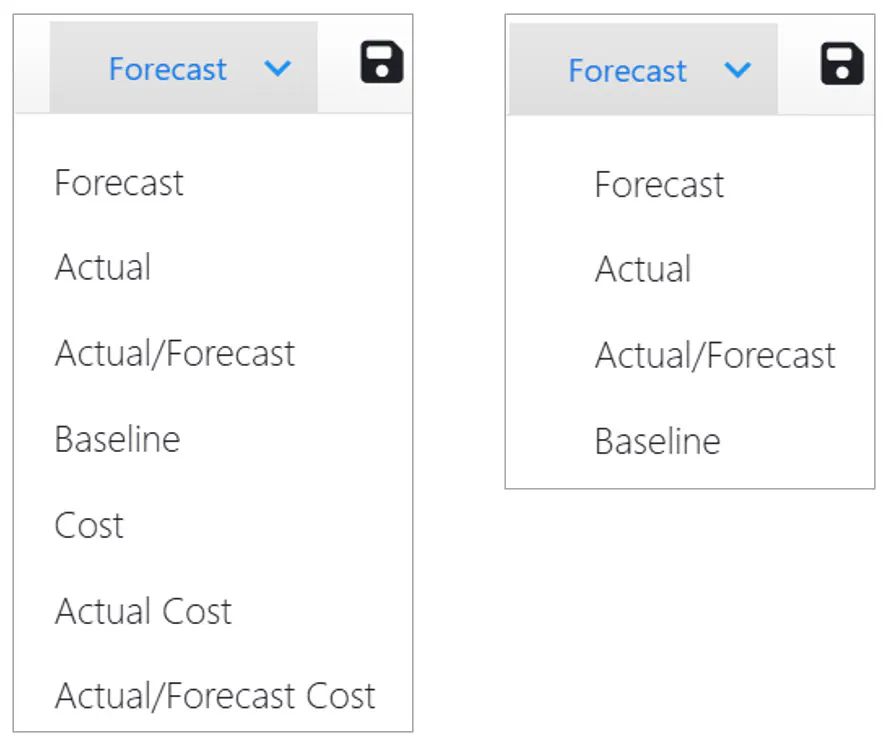
Forecast and Actual – Editable
Any user with rights to edit assignment forecast values can edit actual values as well.
There is no restriction on periods for entry/edit of forecasts or actuals;
Actuals can be modified in future periods
Forecasts can be modified in past periods.
Note: Actual values entered by this method (as opposed to Time Tracking entry) do NOT appear on timesheets.
Actual/Forecast – Editable
The period containing the current date and all following periods contain Forecast values.
Changes in these periods are recorded as forecasts when saved.
All preceding periods contain actuals.
Changes in these periods are recorded as actuals when saved.
Baseline – Read Only
Display period values for the most recent Official baseline (if any). Period cells are empty if there is no Official baseline for the project OR if labor/financial assignments were not included on any official baseline for the assignment project.
Baseline values are read-only.
Labor Cost (Forecast, Actual, Actual/Forecast) – Read Only
Cost type is Forecast Cost.
The system determines a rate for every assignment. The rate is multiplied by the demand in each period to determine the labor cost value. See Understanding Labor Rates.
Labor Cost values are read-only.